The Ultimate Guide to Activating a SIM Card on a New Phone
Imagine this: You’ve just unboxed a shiny new smartphone—its screen gleams with fresh potential and endless possibilities. You’re ready to dive into using your new device, but there’s just one catch: you need to activate the SIM card. For many, this is a crucial first step. Whether you're a tech-savvy individual or someone who avoids gadgets at all costs, activating a SIM card might seem daunting. Fear not! This guide walks you through how to navigate this essential process with ease. 📱
Why Is SIM Card Activation Important?
Before diving into the "how-to," let's consider the "why." A Subscriber Identity Module (SIM) card is a small chip that turns your phone into a powerful communication tool, enabling connectivity to your mobile network. This ensures you can make calls, send texts, and, in most cases, access mobile data.
Activating your SIM card is what bridges the gap between owning a phone and using it to its fullest potential. It ensures your personal data aligns with network databases, setting you up for a seamless user experience. Now, let’s unpack the steps.
Getting Started: Understanding Your SIM Card
What is a SIM Card?
Think of a SIM card as the brain behind your smartphone's communication capabilities. It's a small card inserted into your phone that holds key information:
- Identity for your phone on the network
- Personal phone number
- Contacts and messages (on some older phones)
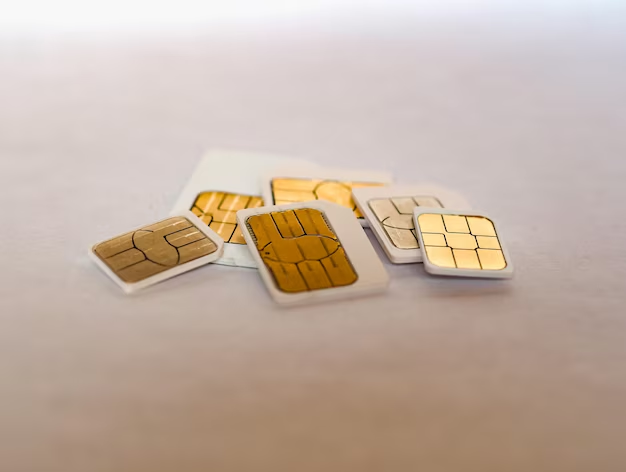
Different Sizes of SIM Cards
Over time, SIM cards have evolved in size:
- Standard SIM Card: The largest type, typically used in older phones.
- Micro SIM Card: A smaller version introduced as smartphones began slimming down.
- Nano SIM Card: The smallest, commonly used in the latest smartphone models.
Ensuring you have the right size for your new phone is crucial, as these do not interchange easily without an adapter.
Step-by-Step: Activating Your SIM Card
1. Insert the SIM Card into Your New Phone
The first step is physical insertion, and it begins with finding the SIM card tray. Most new phones come with a small tool to eject the tray, often known as a SIM ejector tool. No worries if you don’t have one—an opened paper clip works just as well.
Pro Tips for Inserting the SIM Card:
- Ensure your phone is off before inserting or removing a SIM card.
- Handle with care—SIM cards are delicate and can be easily damaged.
- Align the card based on the notch to avoid forcing it into the tray.
2. Power Up and Follow On-Screen Instructions
Once inserted, power your phone back on. Most devices will automatically recognize a new SIM card and prompt you with instructions or settings adjustments. Follow the on-screen steps to complete the basic activation.
3. Network Activation Steps
From here, activation steps can vary depending on your network provider:
- Automatic Activation: Some providers automatically activate your card once inserted.
- Self-Service Activation: This involves entering a unique number on your provider's website or app.
- Customer Service Call: In some cases, a quick call can finish the process.
4. Verify Your Connection
Post-activation, test by making a call or sending a text. Also, ensure your cellular data is functioning. If everything works without a hitch, you're ready!
Common Activation Issues and Their Solutions
Even with clear steps, issues can arise. Here's a quick guide to some frequent problems and how to address them:
SIM Card Not Detected
- Clean the SIM: Dust or debris can interfere with connectivity.
- Reinsert Properly: Ensure the card is seated correctly in the tray.
- Check Compatibility: Verify your new phone supports your carrier's network.
Network Issues
- Restart Your Phone: A simple reboot can often resolve network recognition problems.
- Manual Network Selection: Sometimes setting the network manually helps.
- Signal Interference: Ensure you are in an area with good reception.
Activation Delays
Network congestion or system maintenance can delay activation. If a delay occurs, wait a few hours before attempting further troubleshooting.
Important Considerations and Tips
While the basics cover most situations, a few additional considerations might enhance your activation experience:
Check Carrier Settings & Updates
Ensure your phone's carrier settings are updated to avoid unnecessary compatibility issues. Often, these updates install automatically post-activation.
Backup Important Information
If you’re transferring a SIM from your old phone, back up contacts and other important information. Some old SIM cards can store limited data, but it's always best practice to have a separate backup.
Dual SIM Functionality
Some modern smartphones support dual SIM cards, allowing users to manage personal and professional numbers on one device. If your new phone has dual SIM capability, ensure one of them is set as the primary for outgoing calls and data use.
Summary: Key Steps for SIM Activation 🚀
Here's a quick recap to keep in mind when activating your SIM card:
- 🔍 Identify the correct SIM size for your phone.
- 🛠️ Insert the SIM using the eject tool, ensuring a snug fit.
- ⚙️ Follow device prompts for initial activation steps.
- 🌐 Activate through your mobile carrier, using either automatic, online, or phone methods.
- 📶 Verify functionality post-activation with a test call or message.
Final Insights: Ready, Set, Connect!
Activating a SIM card is a gateway to a new mobile experience. Whether it’s your first phone or an upgrade, this process can become routine with knowledge and preparation. By following these steps, you’ll be communicating, browsing, and connecting in no time. Remember, should you encounter challenges, your provider’s customer service can usually address any unresolved issues.
May your new phone bring you seamless connections and countless memorable moments! 🌟
Discover More
- Are Twic Card Automatically Activated
- Does Visa Gift Card Need To Be Activated
- Do I Have To Activate a Vanilla Gift Card
- Do I Have To Activate a Visa Gift Card
- Do I Have To Activate Visa Gift Card
- Do I Need To Activate a Visa Gift Card
- Do I Need To Activate Visa Gift Card
- Do u Have To Activate a Visa Gift Card
- Do Visa Gift Cards Have To Be Activated
- Do Visa Gift Cards Need To Be Activated