Easy Guide to Changing a Light Switch: A DIY Journey
So, you’ve decided to take on the task of changing a light switch — a project that sounds daunting for many but is quite manageable with the right guidance. Whether you’re upgrading your home’s look, enhancing safety, or simply replacing a faulty switch, transforming this tiny facet of home infrastructure can be surprisingly rewarding. Here’s how you can navigate this journey safely and smoothly.
🏠 Understanding Different Types of Light Switches
Before diving into the actual switch-changing process, it’s important to familiarize yourself with the various types of light switches available. Each type serves different functions, and knowing which one you need is crucial.
Single-Pole Switch
The most basic form of switch, the single-pole switch, controls one light fixture from a single location. It’s often found in areas like bedrooms and living rooms.
Double-Pole Switch
Double-pole switches are used when higher power levels are required. These are common in industrial environments or larger appliances within a home setting.
Three-Way Switch
Three-way switches allow control of a light fixture from two locations, ideal for rooms with multiple entrances like a hallway or a large living room.
Four-Way Switch
For those who need even more control, four-way switches allow a fixture to be controlled from three or more locations, useful in complex lighting layouts.
Smart Switches
With advancements in technology, smart switches offer capabilities such as remote control, automation, and integration with other smart home devices.
🛠️ Tools and Materials You Will Need
Embarking on a DIY project requires the right set of tools. Here’s a list of what you’ll need to change a light switch safely:
- Flat-head screwdriver: For unscrewing the switch plate.
- Phillips-head screwdriver: To remove the screws on the switch itself.
- Voltage tester: To ensure no electrical current is flowing.
- Wire stripper: For cutting and stripping the wires.
- Replacement switch: Choose the right type based on your need.
- Electrical tape: To insulate the wires.
- Wire connectors: For a secure and stable connection.
🍀 Safety First: Prepping Your Work Area
Safety cannot be overstressed when dealing with electricity. Before you start, make sure to follow these essential safety tips:
Turn Off Power
Locate your home’s electrical panel and switch off the circuit breaker that powers the light switch you’re replacing. Use a voltage tester to double-check there’s no electrical current flowing to the switch. This ensures you don’t accidentally play the role of a human fuse.
Check the Environment
Ensure the work area is dry and well-lit. If necessary, use a portable light. Avoid wet conditions as they pose electrical hazards.
Wear Protective Gear
Don’t underestimate the value of basic safety gear. Wearing gloves can protect your hands from cuts and scratches while handling wires.
👩🔧 Step-by-Step Guide to Changing the Light Switch
Let’s break down the process of replacing a light switch into manageable steps to make it as stress-free as possible.
Step 1: Remove the Old Switch
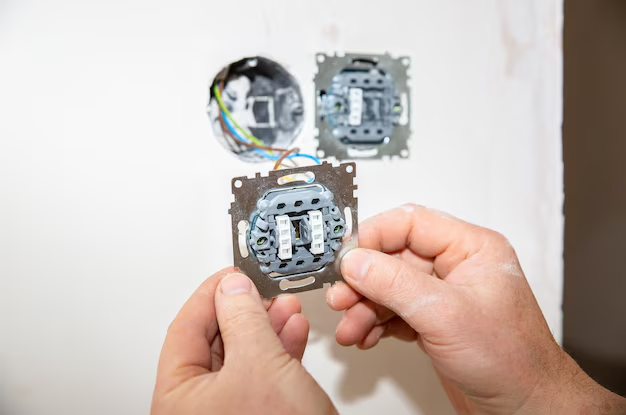
- Unscrew the switch plate covering the light switch using the flat-head screwdriver.
- Remove the screws securing the switch to the electrical box. Pull it out gently from the wall.
Step 2: Examine and Disconnect the Wires
- Use the voltage tester to ensure the power is off.
- Take note of how the wires are connected. It might be helpful to snap a photo for reference.
- Unscrew the wire connectors, removing the switch from the wiring.
Step 3: Connect the New Switch
- Align the new switch with the existing wires. Typically, the black or red wire is the "hot" wire, while white is neutral, and green or bare wire is ground.
- Strip the ends of the wires if needed, exposing about half an inch of copper.
- Attach the wires to the crank screws on the switch. Make sure they’re tightly secured and then wrap them clockwise.
- Secure the wire connectors and wrap a piece of electrical tape over them for added safety.
Step 4: Install the New Switch
- Carefully tuck the wires back into the electrical box, ensuring no wires are pinched.
- Screw the new switch into the box using the screws you removed earlier.
- Attach the new switch plate, ensuring all screws are tight and the switch is properly aligned.
Step 5: Test Your New Switch
- Go back to the circuit breaker and turn the power on.
- Return to the light switch and test its function. If it doesn’t work, double-check the connections and the breaker.
🌟 Troubleshooting and Tips
Sometimes, things don’t go as planned. Here are some common issues and solutions:
Switch Not Working
Check to make sure all wires are securely fastened and the breaker is properly switched on. If the issue persists, consult with a professional electrician.
Sparking When Switch is Used
Sparks can occur due to loose connections. Turn off power immediately and recheck all connections to ensure they’re tight. Persistent sparking should be addressed by a professional.
🌿 Sustainability Tip: Recycling Old Switches
Don’t just throw your old switches away. Many components can be recycled. Check with local recycling centers or e-waste facilities for the proper disposal or recycling options in your area.
📌 Quick Reference Summary
Here’s your handy toolkit for changing a light switch, summarized into quick, easy tips:
- 🧰 Tools: Screwdrivers, voltage tester, wire stripper, replacement switch.
- ⚡ Safety: Turn off power, use a voltage tester, work in a safe environment.
- 🔧 Steps:
- Remove old switch.
- Disconnect and note wiring.
- Connect and secure new switch.
- Test switch function.
With this structured guide, you’re empowered to enhance your home’s functionality with a new light switch. Whether you’re a seasoned DIYer or a beginner, this project not only improves your space but also your confidence in tackling more household improvements. Happy DIYing! 🌟
Related Topics
- How Can I Change Text Message To Imessage
- How Can You Change a Jpeg To a Pdf
- How Do I Change a Jpeg To a Pdf
- How Do I Change a Pdf To a Jpg
- How Do I Change a Pdf To a Word Document
- How Do I Change a Repeating Decimal To a Fraction
- How Do I Change a Text Message To An Imessage
- How Do I Change From Text To Imessage
- How Do I Change Lowercase To Uppercase In Word
- How Do I Change My Political Party To Independent
